top of page
Welcome to Voices at Home: Empowering Caregivers with AAC Tools
Voices at Home: Empowering Caregivers with AAC Tools is a platform aimed at training caregivers and families on using AAC (Augmentative and Alternative Communication) in the home environment with their children. The site features various types of AAC, guidance on implementation at home, research-based practices to assist families, and helpful resources. Additionally, it offers a community forum to foster connection and support among caregivers.
What is it?
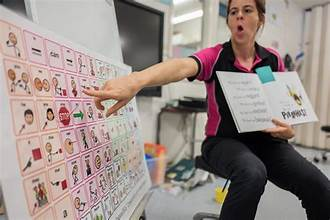
Communication supports that do not require batteries, electricity, or electronic devices. Help children communicate wants/need, thoughts/feelings using pictures, symbols, gestures, or written words.


Low-Tech AAC
Picture boards, choice boards, first/then boards, visual schedules, yes/no cards, gesture systems, written words/letter boards
Use in the home:
Meal time:
- A choice board with pictures of foods and drinks
-Child points to "apple" or hands over the picture to request
-Caregiver models "You want apple. Here's apple"
Play time:
-A core word board with words like go, stop, more, help
-Child point to "more" during game
-Caregiver responds immediately and models the word again
Daily Routines:
-A visual schedule showing steps like wake up, brush teeth, breakfast
-Helps reduce frustration and supports transitions
Getting Help:
-Yes/no cards or a help card
-Child points to "help" when struggling with a toy
-Caregiver responds and labels the communication attempt
Emotional Expression:
-A feelings board with faces (happy, sad, mad, tired)
-Child points to "mad" instead of having a meltdown
-Caregiver validates: "You're mad. Let's fix it together."
How to use it.
Model use: Point to or use the AAC system while you talk.
Keep it available: AAC should be within the child's reach at all times
Respond to attempts: Accept pointing, reaching, eye gaze, or handing over pictures as communication
Do not require speech: The child does not need to say the word verbally to use AAC
Expand communication: If child selects "drink", you might model "want drink" or "more drink".
What is it?
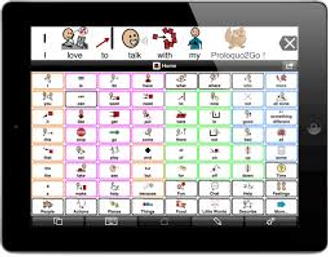
Electronic communication systems that use devices, tablets, or speech-generating technology to produce spoken messages. These systems allow children to communicate suing symbols, pictures, text, or a combination, which are spoken aloud by the device.
High-Tech AAC
Speech generating devices, tablets, dedicated AAC devices, apps, text-to-speech devices, eye-gaze AAC, switch access AAC
Use in the home:
Meal time:
- Child uses the device to select "eat" or specific food items
-Caregiver models language on the device: "You want more food"
-The device speaks the message aloud, reinforcing communication
Play time:
-Child presses "go", "stop", or "more" during play
-Caregiver mirrors the message on the device while responding
-Encourages turn-taking and interaction
Daily Routines:
-Child uses AAC to say "bath", "sleep", or "all done"
-Caregiver models phrases during routines
-Supports transitions and reduces frustration
Getting Help:
-Child selects "help" or "I can't"
-Caregiver responds immediately and labels the message
-Builds functional communication skills
Emotional Expression:
-Child uses AAC to select feelings such as "mad", "sad", or "tired"
-Caregiver acknowledges and expands: "You feel mad. Let's take a break."
-Supports emotional regulation and self-advocacy.
How to use it.
Model use: Use the AAC device while speaking
Keep it available: AAC should be within the child's reach at all times
Respond to attempts: Accept pointing, reaching, eye gaze, or activating a message
Do not require speech: The child does not need to say the word verbally to use AAC
Expand communication: If child selects "drink", you might model "want drink" or "more drink".

High-Tech Options
There are a few AAC Apps you can purchase, below are the options with prices listed.
-
Proloquo2Go- $249.99
-
LAMP Words for Life- $299.99
-
TouchChat HD with WordPower- $149.99-299.99
-
CoughDrop- $6-$9/month OR $295 lifetime
bottom of page